The 30-Minute Subscription Audit (Checklist)
A step-by-step subscription audit you can finish in 30 minutes: gather charges, list them, decide keep, downgrade, pause or cancel, then set reminders.
Key takeaways
- A subscription audit has five timed steps: gather, list, score, act and set reminders.
- Score every subscription as keep, downgrade, pause or cancel, rather than just keep or cancel.
- Do the cancellations during the audit itself, while you have the list and the logins in front of you.
- Repeat a quick audit every quarter and a full one once a year, since yearly renewals only show up over 12 months.
A subscription audit is a 30-minute review of everything you pay for on repeat. You gather your charges, put them in one list, decide whether to keep, downgrade, pause or cancel each one, do it on the spot, and set reminders for what's left.
The point is to make decisions, not just look. Most people know roughly what they pay for. Few have sat down and asked, for each subscription, whether it's still worth it.
Below is a timed plan, a copy-ready checklist, a decision table for the tricky ones, and a schedule for repeating it so you don't have to start from scratch next time.
What you need before you start#
Have these ready so the 30 minutes goes to deciding, not hunting for passwords:
- Your phone (for your Apple ID or Google Play subscriptions)
- Access to your banking app or online statements for every card
- Your PayPal and Amazon logins, if you use them
- Your main email inbox
- A spreadsheet, notes app or subscription tracker to write the list in
- A timer
If it's your first audit, block 45 minutes instead. Finding everything takes longer the first time. After that, 30 minutes is plenty.
The 30-minute plan at a glance#
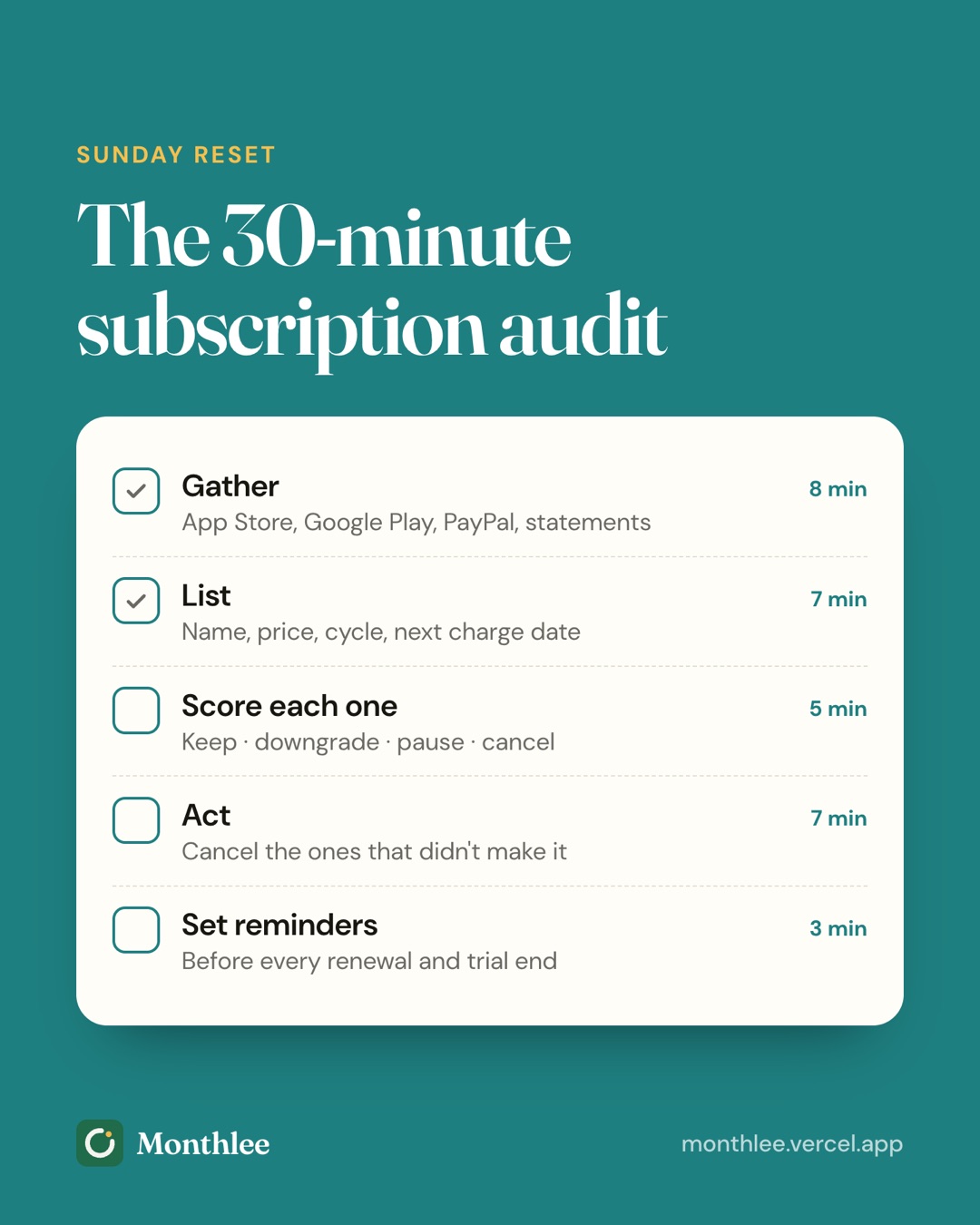
| Time | Step | Goal |
|---|---|---|
| 0–8 min | Gather | Pull every recurring charge from every source |
| 8–13 min | List | One line per subscription, with price, cycle and next charge date |
| 13–21 min | Score | Mark each one keep, downgrade, pause or cancel |
| 21–27 min | Act | Cancel, downgrade or pause right now |
| 27–30 min | Remind | Set reminders for renewals and trials you're keeping |
Step 1: Gather every recurring charge (minutes 0–8)#
Go through each source quickly. You're collecting, not judging yet.
- Apple ID: Settings → [your name] → Subscriptions. Note everything in the Active list.
- Google Play: Play Store → profile picture → Payments & subscriptions → Subscriptions.
- PayPal: on the website, check your automatic payments in Settings.
- Amazon: Account → Memberships & Subscriptions.
- Card statements: scan the last three months for repeats. For your yearly audit, go back 12 months.
- Email: search for "receipt", "renewal", "your subscription" and "trial".
Menus change, so if a path looks different, search the service's help page for "manage subscriptions". If you suspect there's more hiding, our guide on how to find every subscription you're paying for covers phone bills, family accounts and decoding cryptic statement names.
Step 2: Put everything in one list (minutes 8–13)#
Write one line per subscription with:
- Name
- Price (as charged, including tax)
- Billing cycle
- Monthly cost
- Next charge date
- Where it's billed (Apple, Google Play, PayPal, which card)
Convert everything to a monthly cost so you can compare like with like: yearly ÷ 12, quarterly ÷ 3, weekly × 52 ÷ 12. For a fuller explanation with a worked example, see how much you're really spending on subscriptions.
Add up the monthly column and multiply by 12. Write the yearly total at the top of the page. That number tends to sharpen your thinking for the next step.
Step 3: Score each subscription (minutes 13–21)#
This is the heart of the audit. Give every subscription one of four labels.
Keep#
You use it often, it's fairly priced, and you'd sign up again today at this price.
Downgrade#
You use it, but you're paying for more than you need. Examples: a premium tier when the basic one would do, a family plan for one person, extra cloud storage you'll never fill, or an ad-free plan for a service you barely watch.
Pause#
You'll want it again, just not right now. A gym while you're traveling, a meal kit during a busy month, or a streaming service between seasons of the one show you watch. Only some services offer a pause; if yours doesn't, cancel and rejoin later.
Cancel#
You haven't used it in the last two months, it duplicates something else you pay for, or you wouldn't sign up today. Be decisive here. You can nearly always come back.
Questions to ask for each one#
Run through these quickly. If you hesitate on most of them, it's probably a cancel.
- When did I last use it?
- Would I sign up for it today at this price?
- Do I pay for something else that does the same job?
- Is there a cheaper tier or plan that would be enough?
- Is the cost per use reasonable? (Monthly cost ÷ times used.)
- Is someone else in my household already paying for this?
The decision table#
Use this when you're stuck on one.
| Situation | Decision | What to do |
|---|---|---|
| Used weekly, fair price | Keep | Set a renewal reminder |
| Used weekly, but on a premium tier you don't need | Downgrade | Switch to the basic or ad-supported plan |
| Used regularly, plan to keep for a year or more | Keep, consider yearly | Compare monthly vs yearly cost |
| Not used for 1–2 months, coming back soon | Pause | Use the pause option, or cancel and set a reminder to rejoin |
| Not used in 2+ months, no plan to return | Cancel | Cancel now and save the confirmation |
| Two services that do the same thing | Cancel one | Keep the one you use more |
| Free trial you're unsure about | Cancel | Cancel now; most trials keep access until the end date |
| Shared with family, everyone uses it | Keep | Check that nobody else also pays for it |
On the yearly question, a yearly plan only saves money if you'd genuinely keep paying for 12 months. If you might cancel after a few months, the monthly price is the safer choice even when it costs more per month.
Step 4: Act on your decisions now (minutes 21–27)#
Don't save cancellations for later. Later is how you ended up paying for them in the first place.
- Start with the cancels billed through Apple or Google Play. They're the fastest. On iPhone: Settings → [your name] → Subscriptions → pick one → Cancel Subscription. Subscriptions bought through Apple have to be cancelled through Apple, even if the service also has a website. Step-by-step help is in how to cancel subscriptions on iPhone.
- Then the website subscriptions. Open your account page on the service's site, look for Membership, Billing or Plan, and choose Cancel. Menus change, so check the service's help page if yours looks different.
- Then downgrades and pauses. These are usually in the same Billing or Plan section.
- Leave the hard ones for a separate session. Gyms and some memberships may need written notice, a phone call or a visit. Write them down with a date to handle them this week. See how to cancel hard-to-cancel subscriptions for help.
For every cancellation, save the confirmation email or take a screenshot. Note the date access ends; with most subscriptions you keep access until the end of the period you've already paid for.
A worked example of what an audit can save#
Say your audit finds:
- A second music service you forgot about at $11.99/month: cancel
- A video channel add-on at $9.99/month from a show you finished: cancel
- A video streaming plan at $22.99/month that could be a $7.99/month ad-supported tier: downgrade
The savings:
- Cancellations: ($11.99 + $9.99) × 12 = $21.98 × 12 = $263.76 a year
- Downgrade: ($22.99 − $7.99) × 12 = $15.00 × 12 = $180.00 a year
- Total: $263.76 + $180.00 = $443.76 a year
That's from three decisions in about six minutes. The prices above are examples; plug in your own.
Step 5: Set reminders for what you keep (minutes 27–30)#
The subscriptions you keep still need watching. Free trials convert, prices change and yearly renewals arrive when you've forgotten about them.
In your last three minutes:
- Add a reminder a few days before each yearly renewal, so you can decide before you're charged.
- Add a reminder at least a day before any free trial ends. On Apple, cancel at least 24 hours before the trial ends to avoid the charge. More on that in how to avoid getting charged after a free trial.
- Add a calendar reminder for your next audit (see the schedule below).
You can set these in your phone's calendar or reminders app. Or use Monthlee, which keeps your subscriptions, bills and trials in one list and reminds you on the day or 1, 2, 3 or 7 days before each charge, without linking your bank. Its monthly "still using it?" check-ins also nudge you between audits.
The printable subscription audit checklist#
Copy this into your notes app or print it.
Before you start
- Phone, banking app, PayPal and Amazon logins ready
- List or spreadsheet open
- Timer set for 30 minutes
Gather (0–8 min)
- Apple ID subscriptions checked
- Google Play subscriptions checked
- PayPal automatic payments checked
- Amazon memberships checked
- Card statements scanned (3 months, or 12 for the yearly audit)
- Email searched for "receipt", "renewal", "subscription", "trial"
List (8–13 min)
- Every subscription has a name, price, cycle and next charge date
- Every price converted to a monthly cost
- Monthly and yearly totals written at the top
Score (13–21 min)
- Every subscription marked keep, downgrade, pause or cancel
- Duplicates identified
- Free trials identified
Act (21–27 min)
- App store subscriptions cancelled or changed
- Website subscriptions cancelled or changed
- Hard-to-cancel ones scheduled for this week
- Confirmations saved
Remind (27–30 min)
- Reminders set before yearly renewals
- Reminders set before free trials end
- Next audit date in the calendar
- Next statement checked to confirm cancelled charges stopped
How often to repeat your subscription audit#
Once you've done the first full audit, the next ones are faster because the list already exists.
| Frequency | Type | What to check | Time |
|---|---|---|---|
| Monthly | Glance | New charges on your statement, trials ending this month | 5 minutes |
| Every 3 months | Quick audit | Steps 1–5 using 3 months of statements | 15–20 minutes |
| Once a year | Full audit | Steps 1–5 using 12 months of statements, plus yearly renewals | 30–45 minutes |
Good moments for an extra audit: after the holidays (when free trials from gifts and promotions convert), before a big expense, and whenever you notice a price increase.
The bottom line#
A subscription audit takes 30 minutes: gather every charge, put them in one list, score each one as keep, downgrade, pause or cancel, act on the spot, and set reminders for what you keep.
Do your first one this week, using 12 months of statements. Put the next quick audit in your calendar for three months from today, and keep the list updated in between so each audit is shorter than the last.
Frequently asked questions
What is a subscription audit?
A subscription audit is a short review of every recurring charge you pay. You gather all your subscriptions into one list, decide whether to keep, downgrade, pause or cancel each one, act on those decisions and set reminders for the ones you keep.
How often should I audit my subscriptions?
A quick check every three months catches new sign-ups and free trials that converted. A full audit once a year, using 12 months of statements, catches yearly renewals that a single month's statement would miss.
Should I cancel or pause a subscription?
Pause if you expect to come back within a few months and the service offers a pause option, such as a gym or meal kit during travel. Cancel if you haven't used it in two months or more; you can almost always sign up again later.
What should I do after cancelling a subscription?
Save the cancellation confirmation email or screenshot, note the date access ends, and check your next statement to make sure the charge stopped. If it continues, contact the service first, then your bank or card issuer.
Know every charge before it lands.
Monthlee keeps your subscriptions, bills and free trials in one calm list and reminds you before each charge. No bank login. Free for up to 5 subscriptions.
Download on theApp Store- Reminders 1, 2, 3 or 7 days before
- Free-trial warnings
- Monthly and yearly totals
- Cancel guides with direct links
Keep reading
 Save money
Free Alternatives to Paid Subscriptions Worth Trying
Free alternatives to subscriptions: free tiers, library apps, built-in phone apps, open-source software and shared plans, with honest trade-offs for each.
 Save money
Subscriptions on a Student Budget: Keep, Cut and Discounts
How to manage student subscriptions on a tight budget: decide what to keep or cut, check for student pricing, use free campus resources and pause over summer.
 Save money
The Subscription Detox: A 30-Day Reset
A subscription detox is a 30-day reset: pause or cancel everything non-essential, notice what you miss, then add back only what earns its place.