How to Cancel Subscriptions on iPhone (Step by Step)
Cancel a subscription on iPhone in under a minute: Settings, the App Store or a direct link. Plus free trials, missing subscriptions and what to do if it fails.
Key takeaways
- Go to Settings, tap your name, tap Subscriptions, pick the subscription and tap Cancel Subscription.
- You keep access until the end of the period you already paid for, so cancelling early costs you nothing extra.
- Cancel a free trial at least 24 hours before it ends, or you may be charged for the first paid period.
- If a subscription isn't in the list, it's probably billed by the company directly, on another Apple ID, or by a Family Sharing member.
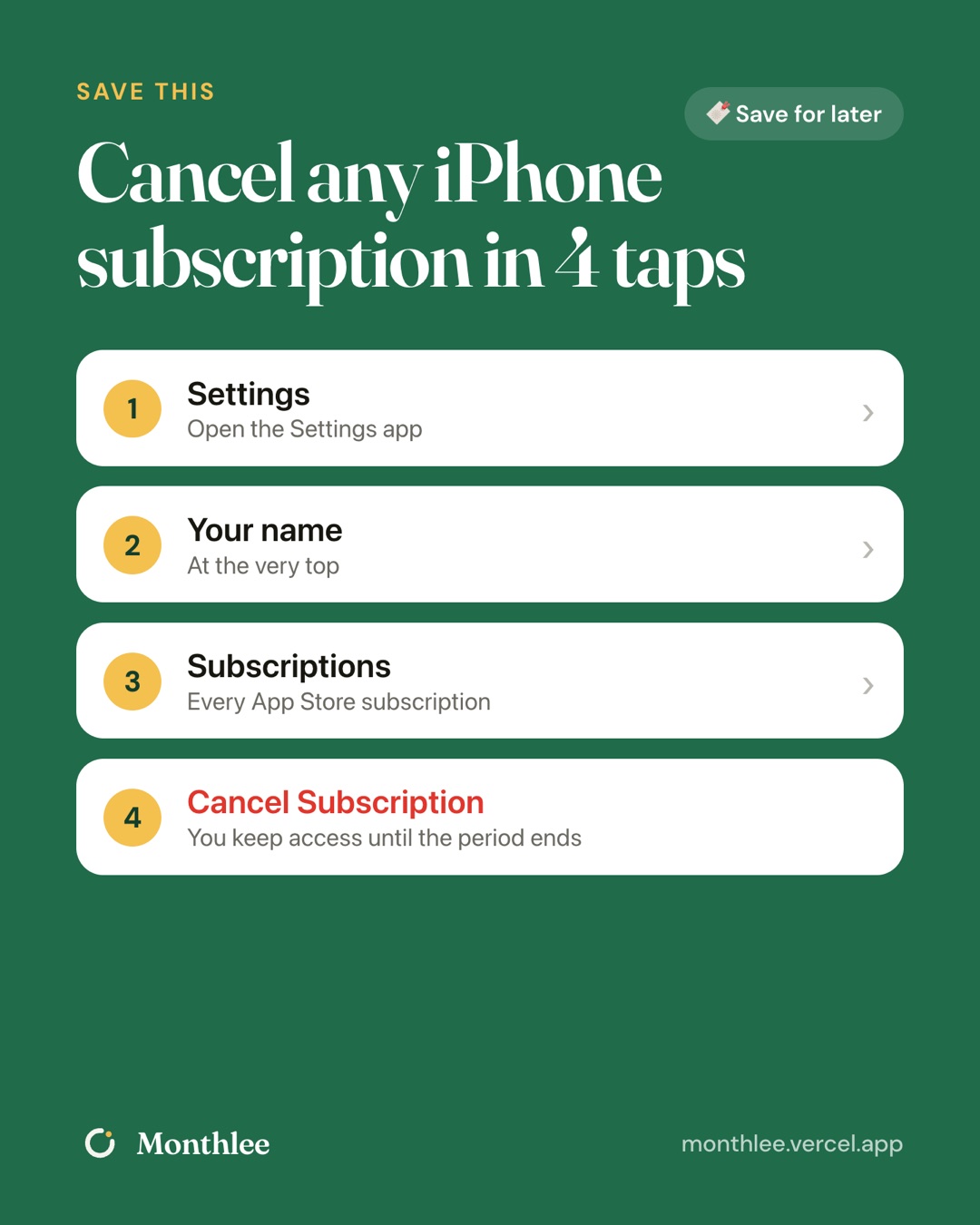
To cancel a subscription on iPhone, open Settings, tap your name at the top, tap Subscriptions, choose the one you want to stop and tap Cancel Subscription. Confirm, and you're done. The whole thing takes under a minute.
You keep access until the end of the period you've already paid for, so there's no penalty for cancelling the moment you decide. If you're on a free trial, cancel at least 24 hours before it ends to avoid the first charge.
If the subscription you're looking for isn't in that list, don't worry. It just means it isn't billed through Apple, and the sections below show where to look instead.
How to cancel a subscription in iPhone Settings#
This is the route most people use, and it works the same way on iPad.
- Open the Settings app.
- Tap your name at the very top of the screen.
- Tap Subscriptions.
- You'll see a list of active subscriptions. Tap the one you want to cancel.
- Tap Cancel Subscription (for a trial, it may say Cancel Free Trial).
- Confirm when asked.
After you confirm, the subscription's page shows the date your access ends instead of a renewal date. That's your proof it worked. Take a screenshot if you want a record.
Apple moves things around between iOS versions, so if your screen looks a little different, look for anything labelled Subscriptions under your Apple account. The direct link below is a reliable fallback.
How to cancel from the App Store app#
If you're already in the App Store, you don't need to switch to Settings.
- Open the App Store.
- Tap your profile picture or account icon in the top corner.
- Tap Subscriptions.
- Pick the subscription and tap Cancel Subscription, then confirm.
It's the same list you'd see in Settings, because both screens show the subscriptions tied to your Apple ID. Use whichever one you find faster.
The direct link: cancel from any browser#
Apple also has a direct page for managing subscriptions: https://apps.apple.com/account/subscriptions.
Open it on your iPhone and it should take you straight to your subscription list. This is handy when you're helping someone else over the phone or when you can't find the menu. You can bookmark it so the next cancellation is one tap away.
Here's a quick comparison of the three routes:
| Route | Where to start | Best for |
|---|---|---|
| Settings | Settings → your name → Subscriptions | The default, works on iPhone and iPad |
| App Store | App Store → profile picture → Subscriptions | When you're already browsing apps |
| Direct link | apps.apple.com/account/subscriptions | When menus look different or you're guiding someone |
All three cancel the same thing. There's no "better" route, only the one you'll remember.
How to cancel a free trial on iPhone#
Free trials are where most surprise charges come from. A trial that converts into an annual plan can cost far more than a single month.
To cancel a trial, follow the same steps as above. In the Subscriptions list, the trial shows up like any other subscription, often with the date it will turn into a paid plan.
The timing rule: cancel at least 24 hours before the trial ends. If you leave it until the last few hours, the renewal may already be processing and you can end up charged.
A few things to know about trials:
- Cancelling early is usually safe. For many apps you can cancel on day one and keep using the trial until it ends. Some apps end the trial as soon as you cancel, though, and the confirmation screen usually tells you which applies.
- Check the price you'd pay. Before you cancel, look at what the trial converts to. If it's an annual plan, that's a bigger charge to avoid.
- Set a reminder for the day before. If you want to keep using the trial to the very end, a reminder two days before the end date gives you room to decide.
For more on this, see how to avoid getting charged after a free trial.
What happens after you cancel#
Cancelling stops the next renewal. It doesn't switch the service off right away and it doesn't refund money you've already paid.
Here's what to expect:
- You keep access until the end of the paid period. If you pay monthly and your next renewal is on the 20th, you can use the service until then.
- No further charges. The subscription won't renew on the next billing date.
- It moves to an expired or inactive section of the Subscriptions screen once it runs out. From there you can resubscribe later if you change your mind.
- Your data may stay in the app. What happens to saved content depends on the app, so export anything you care about before access ends.
A worked example#
Say you pay $9.99 a month for a photo-editing app and you've stopped using it. Your renewal is on the 14th and today is the 2nd.
If you cancel today, you still have 12 days of access you've paid for, and you avoid the next charge. Over a year, that subscription costs $9.99 × 12 = $119.88. Cancelling now saves you every one of those future payments, while costing you nothing for the days you've already paid for.
That's why there's no reason to wait for the "right" moment. Cancel as soon as you decide.
Why a subscription might not appear in your iPhone settings#
This is the most common source of confusion. The Subscriptions list only shows subscriptions billed through your Apple ID. If something's missing, one of these is usually the reason.
You signed up on the company's website#
Many services let you subscribe directly on their own site, such as Netflix, Spotify, a news site or a meal-kit service. When you pay them directly, Apple never sees the subscription, so it won't appear in Settings even if you use the app on your iPhone every day.
A good clue is your bank or card statement. Charges billed through Apple usually show Apple's name (often something like APPLE.COM/BILL). Charges billed directly show the company's own name.
You used a different Apple ID#
If you've ever had more than one Apple ID, perhaps an old one from a previous phone or a work account, the subscription may be on that account.
Search your email for receipts from Apple. Each receipt shows which Apple ID was used. Sign in with that Apple ID (in Settings or at the direct link) to see and cancel its subscriptions.
Someone in your Family Sharing group pays for it#
With Family Sharing, a subscription can be shared with the group while one person pays for it, often the family organiser. The subscription is billed to the person who bought it, so it appears in their Subscriptions list, not yours.
To cancel it, the person who pays needs to cancel it from their own device or account.
If you're not sure where something is coming from, our guide on how to find every subscription you're paying for walks through checking statements, emails and app stores one by one.
How to cancel subscriptions that aren't billed by Apple#
Once you know who bills you, cancelling is straightforward, though every company does it a little differently.
For subscriptions billed directly by the company:
- Go to the company's website and sign in.
- Open your account page and look for Membership, Billing, Plan or Subscription.
- Choose Cancel and follow the prompts. You may be shown a discount or a pause option first. You can decline it.
- Look for a confirmation email and keep it.
Menus change, so check the service's help page if yours looks different. Searching "cancel [service name]" on the company's own help site usually gets you there fastest.
For subscriptions billed through Apple but that also have a website: you must cancel through Apple. The company's website usually can't stop an Apple-billed subscription, even if it shows your plan. If the site tells you to "manage your subscription through the App Store", that's what it means.
For gyms, clubs and memberships with contracts: these often need written notice or a visit. See how to cancel hard-to-cancel subscriptions and memberships for a step-by-step approach and a letter template.
Troubleshooting: when cancelling on iPhone doesn't work#
If something doesn't look right, run through these common situations.
| What you see | What it usually means | What to do |
|---|---|---|
| No Cancel button, just an end date | It's already cancelled | Nothing; access ends on that date |
| The subscription isn't listed | It's billed elsewhere | Check your statement and email receipts |
| You were charged after cancelling | You cancelled after the renewal processed | Request a refund at reportaproblem.apple.com |
| The list is empty | You may be signed in to a different Apple ID | Check which Apple ID is signed in at the top of Settings |
| The app still asks you to pay | Access ended or it's a separate in-app purchase | Check the app's own account screen |
A few more tips:
- Check you're signed in to the right Apple ID. Your name and email at the top of Settings show which account you're looking at.
- Update iOS if menus are missing. Older software can show different screens. The direct link works regardless.
- Give it a moment. Occasionally the change takes a little while to show. Reopen Settings and check again.
- If you were charged unexpectedly, cancelling won't reverse it. Read how to get a refund for an App Store subscription for the steps.
Keep track so you cancel on time#
The hardest part of cancelling isn't the tapping. It's remembering to do it before the next charge, especially for annual plans that renew once a year when you've long forgotten about them.
You can handle this manually: put each renewal date in your calendar with an alert two or three days before. That works well if you only have a few subscriptions.
If you have more than a handful, an app like Monthlee can hold them all in one list and remind you on the day or 1, 2, 3 or 7 days before each charge. You add subscriptions yourself, with no bank login, and it includes cancel guides with direct links to cancellation pages for popular services. If you mark a subscription as cancelled, it counts what you're saving.
Whichever method you choose, the habit matters more than the tool. Our guide to subscription renewal reminders covers how to set one up so it actually works.
The bottom line#
To cancel a subscription on iPhone, go to Settings → your name → Subscriptions, pick it and tap Cancel Subscription. You can also use the App Store or the direct link at apps.apple.com/account/subscriptions.
Cancel as soon as you decide, because you keep access until the paid period ends. For free trials, cancel at least 24 hours before the end date. If a subscription isn't in the list, check whether it's billed by the company directly, on another Apple ID or by a Family Sharing member, and cancel it there.
Then take five minutes to note your remaining renewal dates somewhere you'll see them, so the next cancellation happens before the charge, not after.
Frequently asked questions
How do I cancel a subscription on my iPhone?
Open Settings, tap your name at the top, tap Subscriptions, choose the subscription and tap Cancel Subscription, then confirm. You can also open https://apps.apple.com/account/subscriptions and do the same thing.
Why can't I find a subscription in my iPhone settings?
The iPhone list only shows subscriptions billed through your Apple ID. If you signed up on the company's website, used a different Apple ID, or a Family Sharing member pays for it, you have to cancel it there instead.
Does deleting an app cancel the subscription on iPhone?
No. Deleting an app does not cancel its subscription. You need to cancel it in Settings under your name and Subscriptions, or the subscription keeps renewing.
If I cancel a subscription on iPhone, do I lose access right away?
Usually not. You keep access until the end of the billing period you already paid for, and the subscription simply doesn't renew. Some apps end a free trial straight away when you cancel it.
Can I get my money back after cancelling an iPhone subscription?
Cancelling stops future charges but doesn't refund past ones. To ask for a refund, use reportaproblem.apple.com. Apple reviews each request and refunds aren't guaranteed.
Know every charge before it lands.
Monthlee keeps your subscriptions, bills and free trials in one calm list and reminds you before each charge. No bank login. Free for up to 5 subscriptions.
Download on theApp Store- Reminders 1, 2, 3 or 7 days before
- Free-trial warnings
- Monthly and yearly totals
- Cancel guides with direct links
Keep reading
 Cancel
How to Cancel Amazon Prime (Website, App and Trials)
How to cancel Amazon Prime on the website or app, get past the retention screens, end a free trial, and stop Prime Video channels billed separately.
 Cancel
How to Cancel ChatGPT Plus on Web, iPhone and Android
How to cancel ChatGPT Plus on the website, through the iPhone App Store or Google Play, plus what happens to your chats and access after you cancel.
 Cancel
How to Cancel Netflix (and Keep Your Profile for Later)
How to cancel Netflix on the website, phone, TV or through Apple, Google Play or your carrier, plus what happens to your profile and how to come back later.