How to Get Reminded Before Every Subscription Renews
Set a subscription renewal reminder for every plan using Calendar, Reminders or a tracker app, plus how many days ahead to set it for trials and yearly plans.
Key takeaways
- Don't rely on emails from Apple or the service; they don't arrive for every subscription and you can't choose when.
- A repeating Calendar event or Reminder on your iPhone works for a short list and costs nothing.
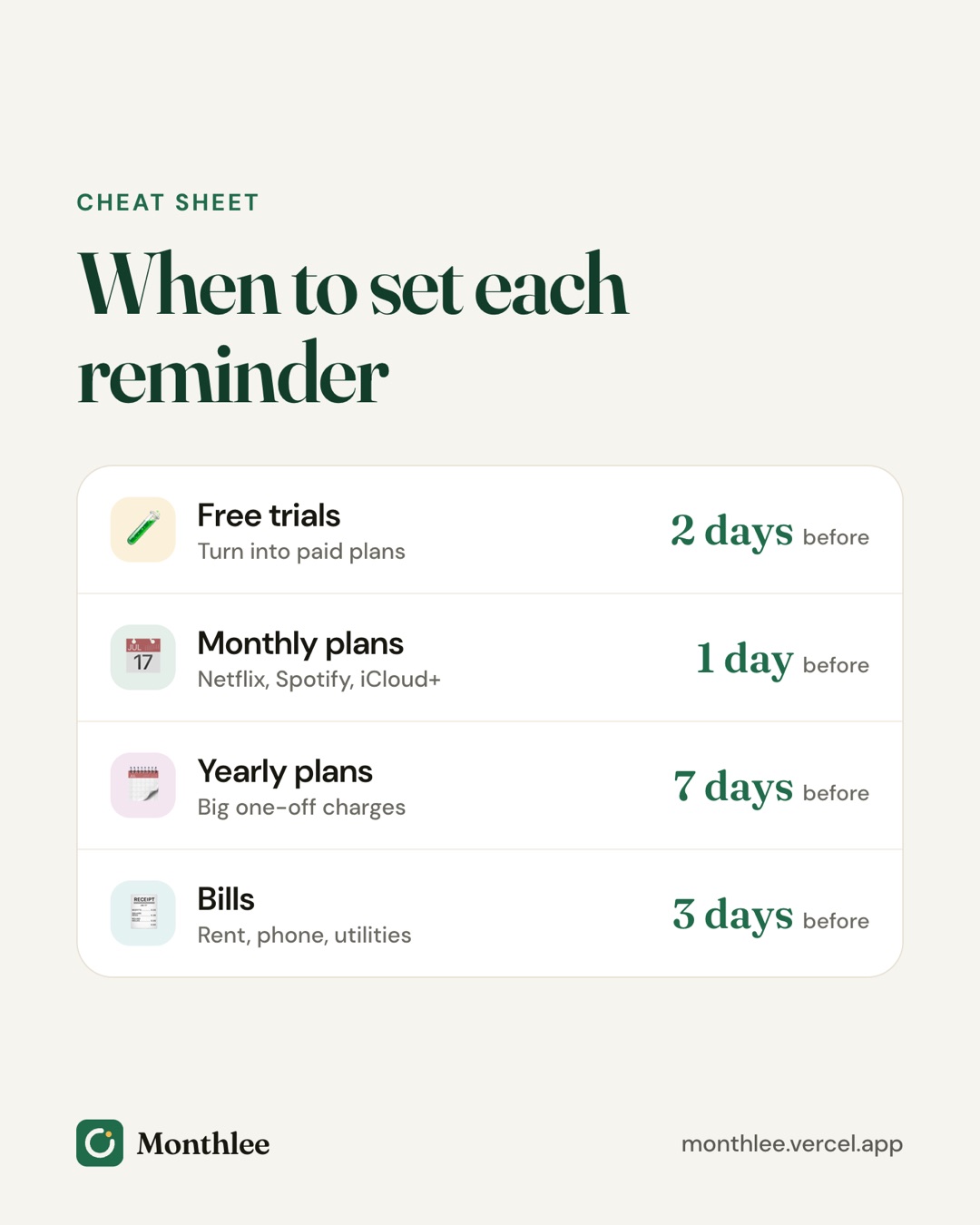
- Give yourself 1 to 3 days for monthly plans, 7 days for yearly plans and 2 to 3 days before a free trial ends.
- For Apple subscriptions, cancel a free trial at least 24 hours before it ends to avoid being charged.
- Set reminders for a time of day when you can actually act on them.
To get reminded before a subscription renews, set your own alert a few days before each charge: a repeating event in your phone's calendar, a repeating item in the Reminders app, or a subscription tracker app that schedules them for you. Don't count on the service to warn you; many won't.
The right lead time depends on the type of charge. Monthly plans need a day or three. Yearly plans and free trials need more. Below you'll find each method step by step, how to pick the timing, and a table of recommended lead times.
Why you need your own renewal reminders#
Most subscriptions renew automatically. That's convenient when you want the service, and expensive when you've stopped using it.
Services have little reason to remind you before they charge you. Some send a notice, many don't, and the ones that do might land in a promotions folder. Setting your own reminder puts the decision back in your hands.
Here's what a forgotten renewal can cost:
- A $15.49/month streaming plan you stopped watching costs $15.49 × 12 = $185.88 over a year.
- A $129 yearly plan you meant to cancel costs the full $129 the moment it renews, or $129 ÷ 12 = $10.75 for each month of the year ahead.
- Three forgotten free trials that turn into $9.99 plans cost 3 × $9.99 = $29.97 in the first month alone.
A reminder that arrives a few days early prevents all three.
Option 1: Emails from Apple or the service#
Before you build anything, know what you already get.
Apple emails a receipt after each charge and notifies you about some changes, such as certain price increases. That's helpful for checking what you paid, but a receipt arrives after the money has gone. You can see every Apple subscription's next renewal date at Settings → [your name] → Subscriptions, or at apps.apple.com/account/subscriptions.
Services you pay directly vary widely. Some send a renewal notice before a yearly charge; many monthly services don't send anything until the receipt.
The problem with relying on emails:
- They don't arrive for every subscription.
- You can't choose how many days ahead they come.
- They're easy to miss in a busy inbox.
Treat these emails as a backup, not your system.
Option 2: Calendar events on iPhone#
Your iPhone's Calendar app can handle renewal reminders for free. Each subscription becomes a repeating event with an alert.
How to add a renewal reminder in Calendar#
- Open the Calendar app and tap the + button.
- In the title, type the subscription name and price, for example "Streaming renews $15.49".
- Turn on All-day, or set a specific time if you prefer.
- Set the Starts date to the next renewal date. You can find this at Settings → [your name] → Subscriptions for Apple subscriptions, or on the service's account page.
- Tap Repeat and choose Every Month or Every Year to match the billing cycle.
- Tap Alert and choose how far ahead you want to be notified, for example 1 day before, 2 days before or 1 week before.
- Optionally, add a Second Alert, for example on the day of the charge.
- In the notes field, paste the cancellation link or write "Cancel in Apple Subscriptions".
- Tap Add.
Tips for calendar reminders#
- Create a separate calendar called "Subscriptions" so these events don't clutter your main view, and so you can hide or show them in one tap.
- Put the price in the event title. When the alert pops up, you'll see the cost without opening anything.
- If a price changes, edit the event and choose to apply the change to all future events.
The downsides#
Calendars are good at alerts but poor at overviews. You can't see your total spend, and if a billing date shifts (for example, after a pause or a plan change) you have to remember to move the event.
Option 3: The Reminders app#
If you prefer a checklist to a calendar, the Reminders app works well too.
- Open Reminders and choose or create a list called "Subscriptions".
- Tap New Reminder and type the subscription name and price.
- Tap the info button next to it.
- Turn on Date and set it to the day you want to be reminded, a few days before the renewal.
- Turn on Time and pick a time when you can act on it.
- Tap Repeat and choose Monthly or Yearly.
- Add the cancellation link in Notes or URL, then tap Done.
Recent versions of iOS also offer an early reminder option in the same screen, so you can set the date to the renewal day itself and get nudged ahead of time.
The advantage over Calendar is that you can tick each reminder off once you've decided, which feels like closing a loop. The disadvantage is the same: no totals, and dates need updating by hand.
Option 4: A subscription tracker app#
A tracker app keeps your list and schedules reminders from it, so you set each subscription up once and the dates roll forward automatically after each renewal.
Monthlee is one example. You add your subscriptions (popular services are one tap), choose to be reminded on the day or 1, 2, 3 or 7 days before each charge, and pick the time of day. Reminders are scheduled on the phone, so they arrive even without signal. It also warns you before a free trial turns into a paid plan. On the paid plans you can add a second reminder on the day, and on Pro your renewals can also appear in your phone's calendar.
If you'd rather keep everything in a spreadsheet or note, that's fine too; just pair it with Calendar or Reminders alerts. Our guide on how to track all your subscriptions in one place compares the methods side by side.
How many days before renewal should you be reminded?#
The right lead time is the shortest one that still leaves room to act. Too early and you'll forget again; too late and you'll be rushing.
Think about three things:
- How long cancelling takes. Apple and Google subscriptions cancel in under a minute. A gym that wants written notice might need much longer, so check its terms.
- How big the charge is. A $2.99 app deserves less planning than a $129 yearly renewal.
- Whether you'll want to compare. Before a yearly renewal, you might want time to check whether switching to monthly, or to a different service, is cheaper. Our guide to monthly vs yearly subscriptions walks through that math.
Choose a time of day you can act on#
Timing within the day matters as much as the number of days. A reminder at 7 a.m. while you're getting ready is easy to swipe away. Pick a time when you usually have a few minutes and your phone in hand, such as early evening.
A useful pattern is two reminders: one a few days ahead to decide, and one on the day as a final check.
Free trials vs renewals vs yearly plans#
These three behave differently, so treat them differently.
Free trials#
A free trial is the riskiest charge because nothing has been billed yet, so nothing appears on a statement to jog your memory. When it ends, it usually converts to a paid plan automatically.
For Apple subscriptions, cancel at least 24 hours before the trial ends to avoid the charge. Set your reminder 2 to 3 days before the end so you have a buffer. With most Apple trials, you can cancel right away and still use the trial until it expires, so you may prefer to cancel the moment you sign up. For more, see how to avoid getting charged after a free trial.
Monthly renewals#
Monthly charges are smaller and frequent. A reminder 1 to 3 days ahead is enough to ask "Did I use this last month?" and cancel if not. If you cancel an Apple subscription, access continues until the end of the paid period, so there's no penalty for cancelling early. Steps are in how to cancel subscriptions on iPhone.
Yearly renewals#
Yearly charges are larger and easy to forget because they happen once. Give yourself a week. That's long enough to check whether you used the service enough to justify it, whether the price has gone up, and whether a monthly plan would be cheaper for how you use it. If you notice the price has changed, our guide on subscription price increases explains your options.
Recommended reminder lead times by subscription type#
| Subscription type | Example | Remind me | Optional second reminder |
|---|---|---|---|
| Free trial (app store) | A 7-day app trial | 2 to 3 days before it ends | 1 day before (last chance to cancel 24 hours ahead) |
| Free trial (direct) | A streaming trial billed to your card | 3 days before it ends | On the last day |
| Monthly, low cost | A $2.99 storage plan | 1 day before | None |
| Monthly, higher cost | A $20 software plan | 2 to 3 days before | On the day |
| Weekly | A $2.99/week app | 1 day before, or review monthly | None |
| Quarterly | A $30 delivery plan | 3 days before | On the day |
| Yearly | A $129 membership | 7 days before | 1 to 2 days before |
| Memberships with notice periods | A gym requiring written notice | Before the notice deadline, not the charge date | 7 days before the deadline |
For memberships that require notice, the reminder date is the notice deadline. If a gym needs 30 days' notice before your billing date, a reminder 3 days before the charge is far too late.
What to do when a renewal reminder goes off#
A reminder only helps if you act on it. When one arrives, run through three quick questions:
- Did I use this since the last charge? If not, cancel now rather than "later". Later is how the next charge happens.
- Is the price still what I expected? Compare it with what you noted when you signed up. A jump from $13.99 to $15.49 adds $1.50 a month, or $18 a year.
- Is there a cheaper way to keep it? A lower tier, a yearly plan, or a family plan you could share might cost less.
If you keep the subscription, do nothing; a repeating reminder will come back next cycle. If you cancel, delete or complete the reminder so it doesn't nag you, and keep the confirmation email until you've seen that the next charge didn't happen.
Snoozing is fine once. If you find yourself snoozing the same reminder every month, that's usually a sign the subscription can go.
The bottom line#
Don't rely on services to warn you. Pick one method today: repeating events in Calendar, repeating items in Reminders, or a tracker app that schedules them for you. Then add every subscription with its next renewal date.
Use 1 to 3 days for monthly plans, 7 days for yearly plans and 2 to 3 days for free trials, and set the alert for a time you can act on it. When a reminder fires, take 30 seconds to decide: keep it, or cancel it now.
Frequently asked questions
Does Apple remind you before a subscription renews?
Apple emails a receipt after you're charged and notifies you about some changes, such as certain price increases, but it doesn't send a reminder you can schedule before every renewal. You can see each renewal date in Settings under your name and Subscriptions, and set your own reminder from there.
How many days before renewal should I set a reminder?
For monthly subscriptions, 1 to 3 days is usually enough. For yearly plans, set it 7 days ahead so you have time to compare options. For free trials, aim for 2 to 3 days before the trial ends.
How do I set a monthly reminder for a subscription on iPhone?
Open the Calendar app, tap the plus button, name the event after the subscription and set the date to the next renewal. Tap Repeat and choose Every Month, then tap Alert and choose how far ahead you want to be notified.
Can I get reminded before a free trial ends?
Yes. Note the trial end date when you sign up and set a reminder 2 to 3 days before it. For trials billed through Apple, cancel at least 24 hours before the end; you can usually keep using the trial until it expires.
Know every charge before it lands.
Monthlee keeps your subscriptions, bills and free trials in one calm list and reminds you before each charge. No bank login. Free for up to 5 subscriptions.
Download on theApp Store- Reminders 1, 2, 3 or 7 days before
- Free-trial warnings
- Monthly and yearly totals
- Cancel guides with direct links
Keep reading
 Guides
How to Track All Your Subscriptions in One Place
How to track subscriptions in one list: find every charge, pick a method, record the right details, set reminders and review it all in 10 minutes a month.
 Guides
How to Share Subscriptions With Apple Family Sharing
How family sharing subscriptions work on iPhone: set up a family group, share eligible subscriptions, who pays, Ask to Buy for kids, and how to stop sharing.
 Guides
Merging Subscriptions as a Couple Without the Awkwardness
A practical guide to couples subscriptions: list both sets, cancel duplicates, decide what's shared or personal, split costs fairly and plan for a breakup.