Unknown Subscription Charge? How to Identify and Stop It
Found an unknown subscription charge on your card? Learn how to identify the merchant, cancel it, ask for a refund and when to call your card issuer.
Key takeaways
- Most unknown subscription charges turn out to be real sign-ups hiding behind an app store, PayPal or a parent company's name.
- Check Apple, Google Play, PayPal, your email and anyone who shares your card before assuming fraud.
- If you find the subscription, cancel it where you signed up, then ask the merchant or app store about a refund.
- If you can't identify the charge, contact your card issuer and ask about disputing it or replacing the card.
If you see an unknown subscription charge on your card, don't panic and don't cancel the card yet. First identify it: search the exact merchant text online, then check your Apple ID, Google Play, PayPal, email receipts and anyone who shares your card. Most mystery charges turn out to be real subscriptions billed under a name you don't recognize.
Once you know what it is, act. Cancel it where you signed up, ask the merchant or app store for a refund if you didn't mean to pay, and contact your card issuer if you still can't explain it or it looks like fraud.
The whole process usually takes 15 to 30 minutes. Here's how to work through it in order.
Why subscription charges show up under strange names#
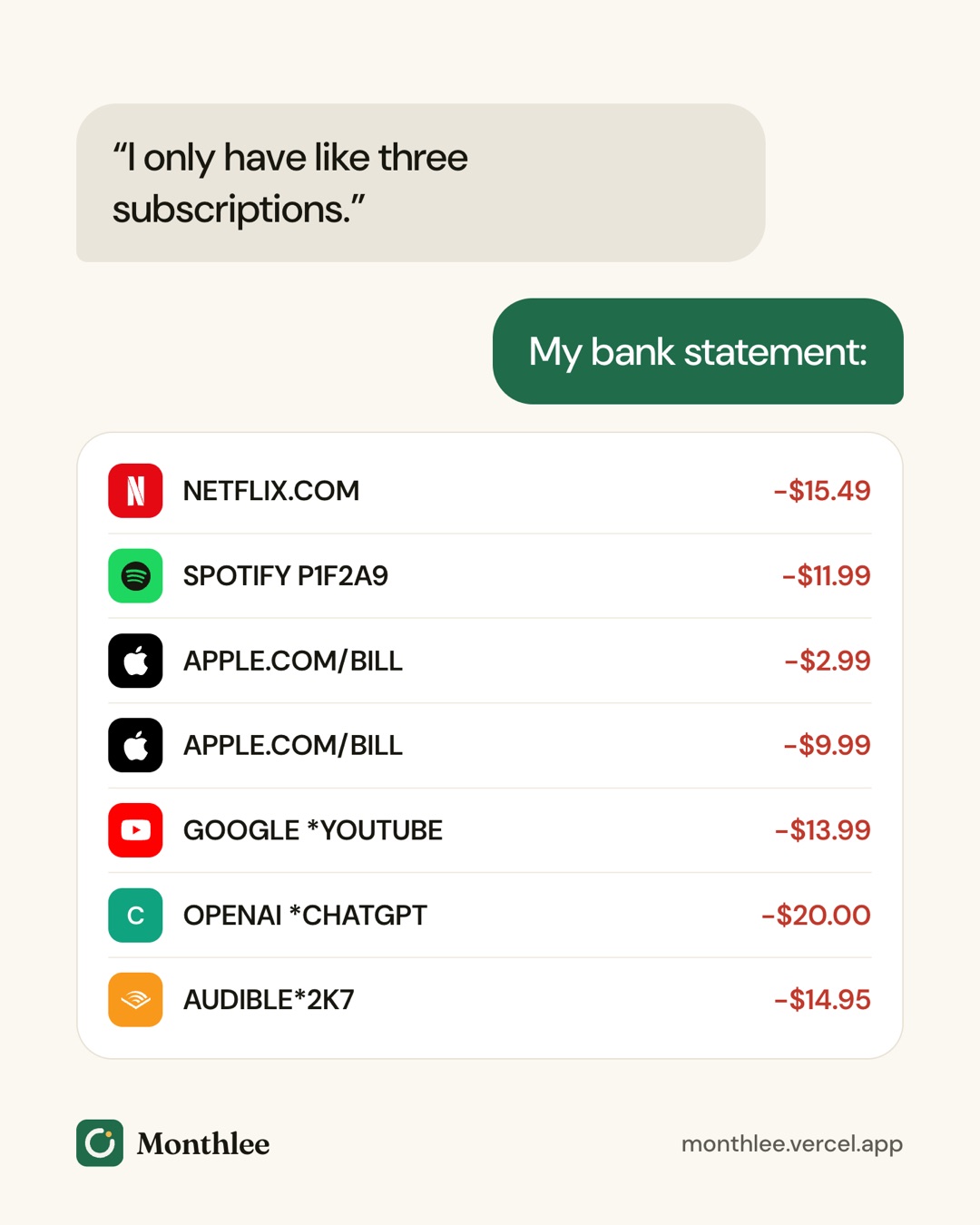
The name on your bank statement often isn't the name of the app or service you remember. A few things cause this:
- App stores bill on behalf of developers. If you subscribed inside an iPhone or Android app, the charge comes from Apple or Google, not the app.
- Payment processors add their own prefix. Payments through PayPal and other processors often start with the processor's name, followed by a shortened merchant name.
- Companies use their legal name. A fitness app might bill as the registered company that owns it, which can sound nothing like the app.
- Descriptors get truncated. Card networks limit how many characters a merchant can show, so names get chopped.
- Bundles and parent companies. One brand may bill several of its products under a single company name.
So a charge that looks unfamiliar is often a perfectly ordinary subscription in disguise. The job is to match it to something you or someone in your household signed up for.
Common statement descriptor patterns#
Exact wording varies by bank, country and merchant, so treat these as general patterns rather than exact strings.
| Billed through | Often looks like | Where to check |
|---|---|---|
| Apple (App Store, iCloud+, Apple Music) | Something with "APPLE.COM" and "BILL" in it | Settings → [your name] → Subscriptions, and reportaproblem.apple.com |
| Google Play | "GOOGLE" followed by an asterisk and a shortened app or developer name | Play Store → profile picture → Payments & subscriptions |
| PayPal | "PAYPAL" followed by an asterisk and a shortened merchant name | PayPal activity and automatic payments |
| Amazon | A variation of "AMZN", "Amazon" or a digital services label | Account → Memberships & Subscriptions |
| Other payment processors | A processor prefix, sometimes a short code, then part of the merchant name | Email receipts around the charge date |
| Direct website sign-ups | The company's legal or parent name, sometimes with a phone number or web address | Search the descriptor, then check your email |
| Phone carrier billing | A line item on your phone bill rather than your card statement | Your carrier's app or itemized bill |
A useful trick: many descriptors include a phone number, city or web address. Those details are often enough to identify the business on their own.
Step 1: Gather the details before you search#
Before you start hunting, write down exactly what you see. It makes every later step faster.
- The full descriptor, exactly as it appears, including asterisks, numbers and any city or phone number.
- The amount, to the cent.
- The date the charge posted, and the transaction date if your bank shows both.
- Which card or account it hit.
- Whether it has happened before. Scroll back through 12 months of statements and look for the same amount or descriptor.
That last point matters. A charge that repeats monthly is almost certainly a subscription. A single charge a year after a previous one is probably an annual renewal. A one-off charge you've never seen before is more likely to be a new sign-up, a trial that converted or something you need to report.
Step 2: Search the merchant name#
Copy the descriptor into a search engine and add the word "charge", for example the descriptor text followed by "charge on credit card". Other people have often asked the same question, and the results usually point to the company behind it.
Tips that help:
- Drop the noise. Remove trailing numbers, reference codes and city names if the full string returns nothing.
- Search the phone number or web address if one appears. It often leads straight to the company's billing support page.
- Check your banking app. Many banking apps now show a cleaned-up merchant name, a logo or a category when you tap the transaction.
If the search names a service you recognize, jump to the cancel and refund steps below. If it names an app store or PayPal, you need to look one level deeper.
Step 3: Check the app stores and PayPal#
Charges from Apple, Google or PayPal don't tell you which app or merchant was behind them. Each has its own record.
Apple#
- Open Settings → [your name] → Subscriptions and look at both Active and Inactive.
- Then sign in at https://reportaproblem.apple.com to see recent purchases and renewals with dates and amounts.
- Match the amount and date to your statement. Apple sometimes combines several purchases into one charge, so add up items from the same day if nothing matches exactly.
If you have more than one Apple ID, or someone in Family Sharing uses your card, check those accounts too.
Google Play#
Open the Play Store, tap your profile picture, then Payments & subscriptions. Check both Subscriptions and Budget & history for the matching amount. If your phone has several Google accounts, switch and check each one. Remember that uninstalling an app doesn't cancel its subscription, so an app you deleted can still be billing you.
PayPal#
In PayPal, check your activity for a payment with the same amount and date. Then look at automatic payments in your settings to see which merchants are allowed to bill you on a schedule. Menus change, so search PayPal's help center for "automatic payments" if you can't find it.
For a full sweep of every place a subscription can hide, see how to find every subscription you're paying for.
Step 4: Search your email and ask around#
Your inbox is often the fastest way to solve the mystery. Search for the amount (for example "12.99"), the descriptor text, and words like "receipt", "renewal", "trial" and "welcome". Narrow the date range to a few days around the charge, and check promotions, updates and spam folders.
Also search any older email addresses you've used. Old accounts are a classic hiding place for subscriptions that renew quietly every year.
If the email search comes up empty, ask the people who might have used your card:
- A partner or roommate who borrowed your card for a sign-up
- Children with game, streaming or app accounts
- Family Sharing members on Apple, or a Google family group
- Anyone with access to a smart TV, console or streaming stick in your home
A quick message to the household often solves it faster than an hour of searching.
Step 5: Think about free trials and annual renewals#
Two of the most common causes of a "mystery" subscription charge are things you did agree to, just a long time ago.
- Free trials that converted. You signed up for a 7-day or 30-day trial, forgot to cancel, and the first paid charge is the first time you hear from them. Look for a welcome email about a week or month before the charge.
- Annual renewals. A yearly plan charges once and then disappears from your mind for 12 months. Check your statement from roughly a year earlier for a similar amount.
A worked example#
Say you spot a $59.99 charge from a company name you've never heard of. You search the descriptor and learn it's the parent company of a photo editing app. Searching your email, you find a free-trial welcome message from that app dated about a week before the charge.
So the trial converted into a yearly plan. $59.99 ÷ 12 works out to about $5.00 a month, which is why it slipped past you: there was no monthly charge to notice. Compare that with a monthly version of the same app at, say, $6.99, which would have cost $6.99 × 12 = $83.88 a year and shown up on every statement. Neither is worth paying for an app you don't open.
If you want to avoid repeats, read how to avoid getting charged after a free trial.
What to do once you've identified the charge#
Once you know which service it is, decide whether you want to keep it. If not, cancel it in the same place you signed up.
- Billed by Apple: Settings → [your name] → Subscriptions → pick the subscription → Cancel Subscription. You keep access until the end of the paid period. See how to cancel subscriptions on iPhone.
- Billed by Google Play: Play Store → profile picture → Payments & subscriptions → Subscriptions → pick one → Cancel subscription.
- Billed by PayPal: cancel the automatic payment in PayPal, and also cancel your account with the service, since stopping PayPal's payments doesn't always close the subscription on the merchant's side.
- Billed directly: sign in to the service's website, open your account, billing or membership page and choose Cancel. Menus change, so check the service's help page if yours looks different.
Take a screenshot of the cancellation confirmation and keep any confirmation email. If the next charge date passes and you're billed again, that record makes a dispute much easier.
Asking for a refund#
If you didn't mean to pay, ask. The worst answer is no.
- Apple: request a refund at https://reportaproblem.apple.com (sign in, choose "I'd like to", then Request a refund). Apple decides, and refunds aren't guaranteed. Getting a refund for an App Store subscription covers this in detail.
- Google Play: many apps' refund requests start from your Play Store order history or Google Play's help pages. Google and the developer decide.
- Direct merchants: contact the company's support team, explain that you didn't intend to renew or forgot to cancel a trial, and ask whether they can refund the latest charge. Many will, especially if you haven't used the service since it renewed.
Be polite and brief, include your account email and the charge date and amount, and ask for a clear yes or no.
When you can't identify the charge#
If you've searched the descriptor, checked Apple, Google Play, PayPal and your email, and asked your household, and the charge still makes no sense, it's time to contact your card issuer.
Calling your bank or card issuer#
Call the number on the back of your card or use the secure messaging in your banking app. Tell them:
- The date, amount and exact descriptor
- That you've checked your app stores, PayPal and email and can't match it
- Whether you've seen similar charges before
Card issuers can often tell you more about the merchant than the statement shows, such as a fuller business name or contact details. If it still can't be explained, they can tell you about disputing the charge and how their process works.
Signs it might be fraud#
Take it more seriously if you see:
- Several small charges in a row, especially tiny test-sized amounts
- Charges from countries or currencies you don't use
- A sudden cluster of new merchants on the same day
- A charge on a card you rarely use or keep in a drawer
In that case, ask your card issuer about blocking or replacing the card. A new card number stops that merchant from charging the old one. Keep in mind that some issuers pass updated card details to merchants you've already set up, so check your legitimate subscriptions afterwards. What happens to your subscriptions when your card changes explains what to expect.
Also change the password on any account that stores your card, especially if it's reused elsewhere.
How to stop it happening again#
An unknown charge is a sign that your subscriptions have drifted out of view. A few habits keep that from happening:
- Keep one list of every subscription, its price, billing cycle, next charge date and where it's billed.
- Use fewer payment methods for subscriptions, so there's only one or two statements to scan.
- Check your statements monthly, not just when something looks off.
- Set a reminder before every renewal and every trial end.
- Run a full review once or twice a year with a subscription audit checklist.
A spreadsheet works if you'll keep it updated. If you'd rather have reminders without connecting your bank, Monthlee lets you add each subscription yourself (popular services fill in their logo, price and cycle in one tap), warns you before trials turn into paid plans, and after each renewal asks whether the charge matched what you expected. That last check makes it easier to spot something odd while it's still fresh.
The bottom line#
An unknown subscription charge is usually a real subscription with an unfamiliar name. Write down the descriptor, amount and date, search the name, then check Apple, Google Play, PayPal, your email and your household.
If you find it, cancel it where you signed up and ask for a refund if you didn't mean to pay. If you can't explain it, call your card issuer, ask about a dispute and replace the card if it looks like fraud. Then put every subscription you keep into one list so the next charge never comes as a surprise.
Frequently asked questions
Why is there a subscription charge on my card I don't recognize?
Usually it's a real subscription billed under a different name, such as an app store, PayPal or the legal name of the company behind an app. Free trials that converted, yearly renewals and family members using your card are also common causes. If none of those explain it, contact your card issuer.
How do I find out what company charged me?
Search the exact text from your statement online with the word "charge", and look for a phone number or website in the description. Then check your Apple ID or Google Play purchase history, PayPal activity and email receipts around the charge date for a matching amount.
Can I get a refund for a subscription charge I didn't want?
Sometimes. Contact the merchant first, or request a refund through Apple at reportaproblem.apple.com or through Google Play if the subscription was billed there. Refunds are at the seller's or store's discretion and aren't guaranteed.
Should I cancel my card if I see a charge I don't recognize?
Only once you've ruled out a real subscription. If you can't identify the charge after checking your app stores, PayPal, email and family members, call your card issuer. They can investigate, dispute the charge and replace the card if it looks like fraud.
Know every charge before it lands.
Monthlee keeps your subscriptions, bills and free trials in one calm list and reminds you before each charge. No bank login. Free for up to 5 subscriptions.
Download on theApp Store- Reminders 1, 2, 3 or 7 days before
- Free-trial warnings
- Monthly and yearly totals
- Cancel guides with direct links
Keep reading
 Guides
How to Track All Your Subscriptions in One Place
How to track subscriptions in one list: find every charge, pick a method, record the right details, set reminders and review it all in 10 minutes a month.
 Guides
How to Share Subscriptions With Apple Family Sharing
How family sharing subscriptions work on iPhone: set up a family group, share eligible subscriptions, who pays, Ask to Buy for kids, and how to stop sharing.
 Guides
Merging Subscriptions as a Couple Without the Awkwardness
A practical guide to couples subscriptions: list both sets, cancel duplicates, decide what's shared or personal, split costs fairly and plan for a breakup.